
AI Video Tools Directory — Updated Regularly

Best AI Video Tools for BeginnersFree AI Video Makers, Editors & Generators

Explore the best AI video tools for beginners — from free AI video makers and text-to-video generators to AI avatars, auto-captioning, and short clip creation tools. This AI video tools for beginners directory includes free plan details, honest ratings, and practical beginner tips to help you start creating video content today.

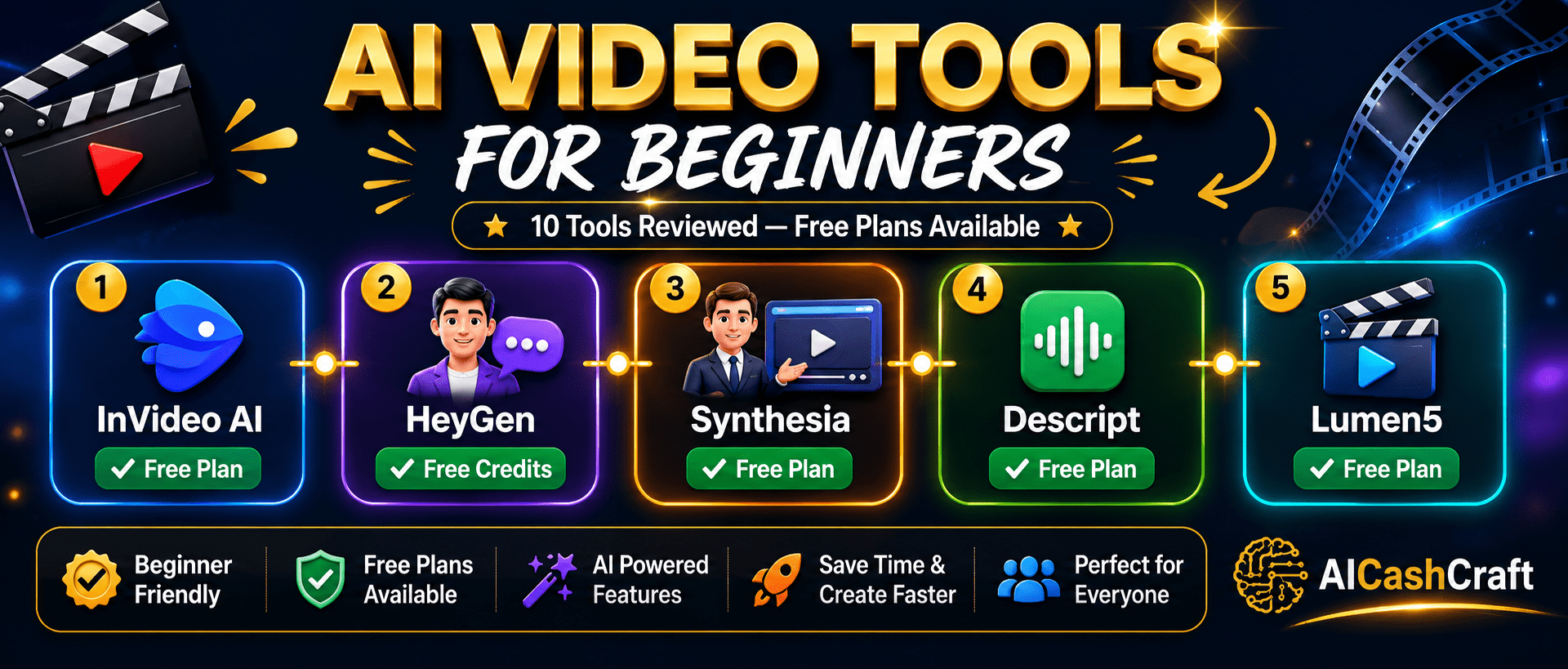
best AI video tools for beginners free AI video maker editor captions avatars AICashCraft
🎬
10 Video ToolsReviewed for beginners
AI VideoSimple creation roadmap
💰
7 Free Plans$0 cost to start
best AI video tools for beginners overview InVideo HeyGen Synthesia Descript AICashCraft
Complete Directory

10 Best AI Video Tools for Beginners

These free AI video tools for beginners cover text-to-video, AI avatars, auto-captioning, video editing, and short-form clip creation. Whether you need a free AI video maker, a faceless YouTube tool, or an AI video editing tool — this directory covers all the best options. Looking for CapCut, Runway ML, or Pictory? Find them on our main AI Tools page →

Jump to a tool:

🎬
InVideo AI
Best Free AI Video Maker for Beginners — Type a Prompt, Get a Full Video
Free PlanEditor’s Pick

InVideo AI is the most beginner-friendly free AI video maker available — you simply type a text prompt describing the video you want and InVideo AI produces a complete video with stock footage, voiceover, captions, and background music in minutes. No video editing experience is required. As one of the best AI video tools for beginners, the free plan includes 10 AI video exports per week with InVideo watermark — sufficient for testing and building a video content workflow from scratch.

Free Plan✅ Yes — 10 exports/week
Paid PlanFrom $25/month (Plus)
Best ForText-to-video, YouTube, social media
Websiteinvideo.io
OutputFull video with voiceover + captions
Stock Library16M+ stock clips included
Key Features
Text prompt to full video
AI voiceover in 50+ languages
Auto captions and subtitles
16M+ stock footage library
Background music included
Script writing AI built-in
Multiple video format exports
Team collaboration (paid)
💡 Beginner Tip: Type a detailed prompt for better results. Instead of “a video about AI tools,” try “a 60-second YouTube video explaining the top 3 free AI tools for beginners, professional tone, upbeat music, captions.” The more detail you provide, the more accurate the video output. Use our free Prompt Generator for video script ideas.
🤖
HeyGen
Best AI Avatar Video Generator — Create Talking-Head Videos Without a Camera
Free CreditsAI Avatars

HeyGen creates professional talking-head videos using AI avatars — you type a script and a realistic AI avatar delivers it on screen, completely without a camera or recording setup. This is ideal for beginners who want to create YouTube videos, explainer content, or course videos without appearing on camera themselves. HeyGen also includes a video translation feature that can translate and re-lip-sync existing videos into 40+ languages automatically. Free plan includes 1 free video per month.

Free Plan✅ Yes — 1 video/month
Paid PlanFrom $29/month (Creator)
Best ForFaceless videos, explainers, courses
Websiteheygen.com
Avatars100+ realistic AI avatars
Languages40+ language translation
Key Features
100+ realistic AI avatars
Text-to-video with avatar
Video translation in 40+ languages
Custom avatar creation
AI voice cloning
Lip-sync technology
Talking photo feature
API access for automation
💡 Beginner Tip: HeyGen’s video translation feature is one of the most powerful — upload any existing video and HeyGen re-lip-syncs the avatar speaking in a different language. This allows beginners to reach global audiences by translating their content into Spanish, Hindi, French, or other languages without re-recording.
🎭
Synthesia
Best AI Video Platform for Professional Training and Explainer Videos
Free PlanProfessional

Synthesia is the leading professional AI video platform used by thousands of businesses for training videos, product demos, and internal communications. It generates polished talking-head videos from text scripts using AI avatars — with a significantly more professional look than most competitors. The free plan allows up to 3 minutes of video per month, which is sufficient to test the platform and create short explainer videos. Synthesia is best for users who need professional-quality AI video output.

Free Plan✅ Yes — 3 min/month
Paid PlanFrom $29/month (Starter)
Best ForTraining videos, professional content
Websitesynthesia.io
Avatars160+ diverse AI avatars
Languages120+ languages supported
Key Features
160+ professional AI avatars
120+ language support
Screen recording integration
Slide-based video creation
Custom background options
Brand kit integration
Video analytics (paid)
SCORM export for LMS
💡 Beginner Tip: Synthesia works best for structured, script-driven content — training modules, product tutorials, and educational videos. Write your full script first, then paste it into Synthesia. Keep individual video segments under 2 minutes for best viewer retention. The 120+ language support makes it ideal for creating multilingual content from one script.
🎙️
Descript
Best AI Video Editing Tool That Lets You Edit Video Like a Document
Free PlanUnique Editor

Descript is a unique AI video editing tool that works differently from every other platform — it transcribes your video automatically and lets you edit the video by editing the text transcript. Delete a word from the transcript and that word is removed from the video. This makes it one of the fastest free AI video tools for beginners who record talking-head videos, tutorials, and podcasts. Descript also includes AI voice cloning, filler word removal, background noise elimination, and automatic captions.

Free Plan✅ Yes — 1 hr transcription
Paid PlanFrom $24/month (Hobbyist)
Best ForPodcast editing, tutorials, vlogs
Websitedescript.com
Unique FeatureEdit video by editing text
AI AudioFiller word + noise removal
Key Features
Edit video by editing transcript
Auto transcription (95%+ accuracy)
AI filler word removal (um, uh)
Background noise elimination
AI voice cloning (Overdub)
Automatic captions and subtitles
Screen recording built-in
Podcast + video in one tool
💡 Beginner Tip: Descript’s filler word removal is invaluable — it automatically detects and removes “um,” “uh,” “like,” and other filler words from your recordings in one click. For beginners who struggle with confident on-camera delivery, this feature alone can make a significant difference in how professional your finished video sounds.
💡
Lumen5
Best Free AI Video Maker for Turning Blog Posts Into Videos
Free PlanBlog to Video

Lumen5 is a free AI video maker that specializes in converting written content — blog posts, articles, and scripts — into engaging social media videos automatically. Paste a blog post URL or text, and Lumen5 uses AI to extract key sentences, match relevant stock footage, and produce a complete video ready for LinkedIn, Instagram, Facebook, or YouTube. For content creators looking for free AI video tools for beginners that repurpose existing content, Lumen5 is the most efficient option available.

Free Plan✅ Yes — 5 videos/month
Paid PlanFrom $29/month (Basic)
Best ForBlog-to-video, content repurposing
Websitelumen5.com
Unique FeatureAuto blog post to video
Stock LibraryMillions of clips + images
Key Features
Blog URL to video in minutes
AI sentence extraction
Automatic stock footage matching
Multiple aspect ratios
Custom branding (paid)
Text animation styles
Background music library
Social media format presets
💡 Beginner Tip: Lumen5 works best for converting your existing blog posts into LinkedIn or Facebook video posts. Paste the URL of any published blog post, let Lumen5 extract the key points, then adjust the clip selection and text placement. This is one of the fastest ways to repurpose written content you have already created into video format.
✂️
Clipchamp
Best Completely Free AI Video Editing Tool for Beginners — Built Into Windows
100% FreeWindows Built-In

Clipchamp is Microsoft’s completely free AI video editing tool — now built directly into Windows 11 — making it the most accessible free AI video tool for beginners. It includes AI-powered auto-captions, text-to-speech voiceover, social media format templates, and a clean drag-and-drop timeline. Unlike most AI video tools for beginners, Clipchamp has no watermarks, no export limits, and no credit card required. It exports in up to 1080p HD for free, making it the best zero-cost AI video maker for Windows users.

Free Plan✅ 100% Free — No limits
Paid PlanPremium features via Microsoft 365
Best ForGeneral video editing, Windows users
Websiteclipchamp.com
No Watermark✅ Free exports without watermark
ExportUp to 1080p HD free
Key Features
No watermark on free exports
1080p HD export free
AI auto-captions
Text-to-speech AI voiceover
Built into Windows 11
Drag-and-drop timeline
Social media format templates
Stock footage library (basic)
💡 Beginner Tip: Clipchamp is the best starting point for Windows users who want a completely free video editor with no limits or watermarks. Use it for YouTube videos, social media Reels, and tutorial content. The AI auto-captions feature alone makes it worth using — it adds accurate subtitles to any video automatically without manual typing.
🎥
Veed.io
Best Browser-Based AI Video Editor With Auto-Captions and Subtitles
Free PlanAuto-Captions

Veed.io is a browser-based AI video editor with exceptional auto-captioning, subtitle translation, and video enhancement tools — no installation required. Its subtitle editor is the strongest available in a free tool, supporting accurate captions in 100+ languages with customizable fonts, colors, and animation styles. The free plan includes unlimited video creation with Veed.io watermark on exports. Veed.io is particularly useful for social media creators who need captioned videos for Instagram Reels, TikTok, and LinkedIn posts.

Free Plan✅ Yes — Unlimited (watermark)
Paid PlanFrom $18/month (Basic)
Best ForCaptioned social media videos
Websiteveed.io
Captions100+ language auto-captions
BrowserNo download required
Key Features
Auto-captions in 100+ languages
Animated subtitle styles
Background noise removal
Eye contact correction AI
Video translation feature
Screen + webcam recording
Avatar presenter feature
AI script generator
💡 Beginner Tip: Veed.io’s eye contact correction feature is surprisingly effective — it uses AI to adjust your gaze to appear as if you are looking directly at the camera even when reading from a script. For beginners recording tutorial videos while reading notes, this makes a noticeable improvement in how engaged and confident you appear on screen.
🔊
Fliki
Best Free AI Video Tool for Text-to-Video With Natural AI Voiceovers
Free PlanAI Voiceover

Fliki converts text, blog posts, and scripts into videos with highly natural AI voiceovers — the voice quality is consistently rated among the best in the AI video space. You write or paste your script, choose from 2,000+ AI voices in 75+ languages, and Fliki automatically matches relevant stock clips to each sentence. The free plan includes 5 minutes of video creation per month with Fliki watermark. It is the best tool for creating faceless YouTube videos, explainer content, and audio-first video content.

Free Plan✅ Yes — 5 min/month
Paid PlanFrom $28/month (Standard)
Best ForFaceless YouTube, voiceover videos
Websitefliki.ai
Voices2,000+ AI voices in 75+ languages
Voice QualityBest-in-class natural voices
Key Features
2,000+ AI voices in 75+ languages
Text-to-video with auto stock match
Blog post URL to video
AI image generation included
Tweet-to-video feature
Audio-only podcast creation
Voice cloning option
Brand voice settings
💡 Beginner Tip: Fliki’s voice quality is its standout strength — spend time selecting the right AI voice for your content style. Listen to samples across multiple voices before committing. For educational or tutorial content, use a calm, clear voice. For motivational content, a more energetic voice style works better and keeps viewers engaged.
Steve AI
Best Free AI Video Tool for Converting Scripts Into Animated and Live Videos
Free PlanAnimated Video

Steve AI specializes in converting text scripts into both live-action stock footage videos and animated cartoon-style videos — giving beginners two distinct visual options for their content. The animation feature is unique among free AI video tools for beginners — it generates illustrated, cartoon-style explainer videos that stand out from typical AI video tools. This makes Steve AI particularly useful for educational content and explainer videos where animation is more engaging than stock footage. Free plan includes 1 video per month.

Free Plan✅ Yes — 1 video/month
Paid PlanFrom $20/month (Lite)
Best ForAnimated explainers, education
Websitesteve.ai
Video TypesLive video + Animation both
Characters50+ animated characters
Key Features
Text-to-live video generation
Text-to-animated video
50+ animated characters
Blog-to-video conversion
AI voiceover in 30+ languages
Custom brand colors
Background music library
Multiple video format presets
💡 Beginner Tip: Use Steve AI’s animation mode for educational or tutorial content where complex ideas benefit from visual illustration. Animated videos tend to hold viewer attention longer for educational topics. Start with a simple, clear script — animations work best with short, punchy sentences rather than long explanatory paragraphs.
📱
OpusClip
Best Free AI Video Tool for Turning Long Videos Into Viral Short Clips
Free PlanViral Clips

OpusClip is a free AI video tool that automatically identifies the most engaging moments in long-form videos and repurposes them into short viral clips for TikTok, Instagram Reels, and YouTube Shorts. Upload a podcast episode, webinar, or long YouTube video, and OpusClip extracts the best 30-90 second segments, adds animated captions, reframes the video vertically, and scores each clip by viral potential. As one of the most practical AI video tools for beginners who already have long-form content, OpusClip’s free plan includes 60 minutes of uploads per month.

Free Plan✅ Yes — 60 min uploads/mo
Paid PlanFrom $15/month (Starter)
Best ForLong-video to short clips, repurposing
Websiteopus.pro
Unique FeatureViral hook score per clip
Auto CaptionsAnimated captions auto-added
Key Features
AI highlights best moments
Viral hook score per clip
Auto animated captions
Auto vertical reframing
Speaker detection and tracking
Direct social media sharing
YouTube link upload support
Brand kit (watermark, colors)
💡 Beginner Tip: OpusClip works best with content-rich long videos — podcasts, webinars, YouTube tutorials, and interview recordings. A 30-minute podcast episode can generate 8-12 quality short clips for TikTok and Reels. Use the viral hook score to prioritize which clips to post first — higher scores generally perform better on short-form platforms.
Quick Comparison

Best AI Video Tools for Beginners — Side by Side
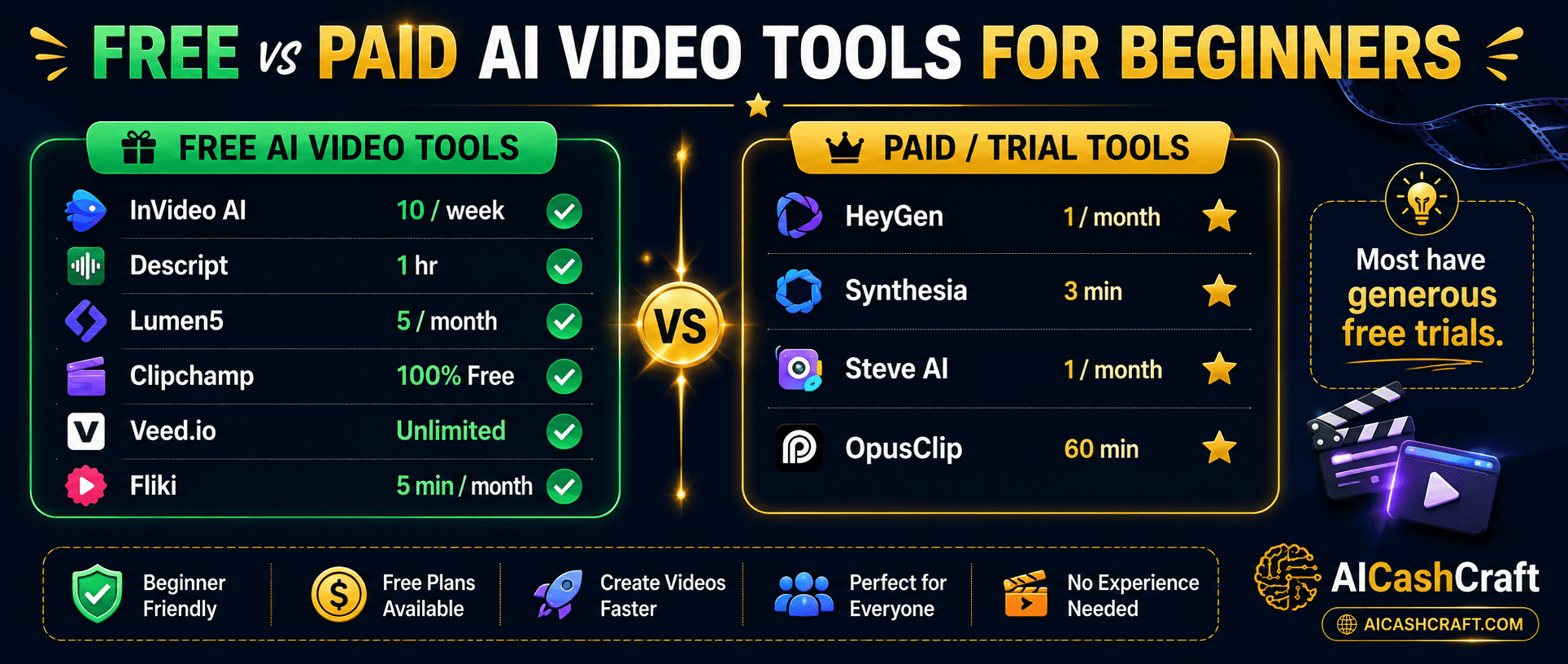
AI video tools comparison free vs paid beginners guide AICashCraft
ToolFree PlanPaid FromBest ForRating
InVideo AI✅ 10 exports/week$25/moText-to-video, social media★★★★★
HeyGen✅ 1 video/month$29/moAI avatar videos★★★★★
Synthesia✅ 3 min/month$29/moProfessional training videos★★★★☆
Descript✅ 1hr transcription$24/moPodcast and tutorial editing★★★★★
Lumen5✅ 5 videos/month$29/moBlog to video conversion★★★★☆
Clipchamp✅ 100% FreeMicrosoft 365General editing, Windows★★★★★
Veed.io✅ Unlimited (watermark)$18/moAuto-captions, social media★★★★☆
Fliki✅ 5 min/month$28/moFaceless YouTube, voiceover★★★★☆
Steve AI✅ 1 video/month$20/moAnimated explainer videos★★★★☆
OpusClip✅ 60 min/month$15/moLong video to short clips★★★★★
Free AICashCraft Tools

Free Tools Built for AICashCraft Readers

Find your best AI video tool, get expert prompts, explore income ideas — all completely free.

FAQs

Frequently Asked Questions — Best AI Video Tools for Beginners
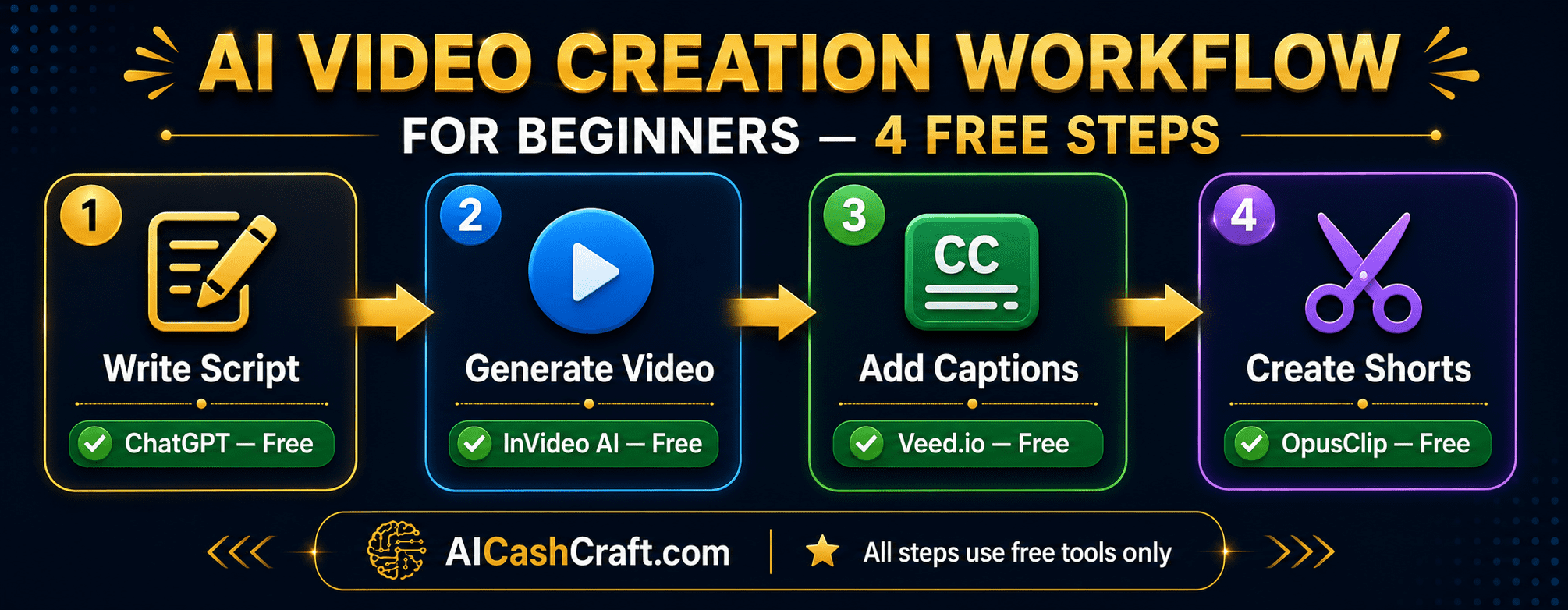
AI video creation workflow for beginners step by step free tools AICashCraft
What is the best free AI video tool for beginners?

Clipchamp is the best completely free AI video tool for beginners — watermark-free 1080p exports, AI auto-captions, and no limits whatsoever. For text-to-video, InVideo AI is the best free AI video maker with 10 exports per week. For AI avatar videos, HeyGen offers 1 free video per month. Use our free AI Tool Finder Quiz for a personalized recommendation.

Can I create YouTube videos without showing my face using AI?

Yes — several free AI video tools for beginners support faceless video creation. InVideo AI generates complete videos using stock footage and AI voiceover. HeyGen and Synthesia create videos with AI avatars that appear on screen instead of you. Fliki generates text-to-video with AI voiceover and stock clips. OpusClip repurposes long content into short clips automatically. See our guide on AI Tools for Social Media Managers for a complete content workflow.

Which AI video tool is best for adding captions automatically?

Veed.io has the most accurate and customizable auto-caption system — supporting 100+ languages with animated subtitle styles. Descript also adds excellent captions through its transcript-based editing system. Clipchamp’s free auto-captions are very good for Windows users. OpusClip adds animated captions automatically to every short clip it generates.

How do I turn a blog post into a video using free AI video tools?

Lumen5 is specifically built for this — paste your blog post URL and it automatically extracts key sentences, matches stock footage, and creates a social media video. InVideo AI and Fliki also accept text input from blog posts and generate complete videos. See our AI affiliate blog guide for how to pair blogging and video content creation.

Start Creating With AI

Ready to Use the Best AI Video Tools for Beginners?

Find your best free AI video tool, get expert video prompts, and explore video content income ideas — all completely free at AICashCraft.

Free PDF Download

Top 10 Free AI Tools for Beginners

Download our free 13-page PDF guide covering the best free AI tools with beginner tips and step-by-step advice. No sign-up needed.

⬇️ Download Free PDF Guide