🎬 No Camera • No Face • No Experience Needed
A faceless YouTube channel is one of the most beginner-friendly online content opportunities available today — and AI tools have made it genuinely accessible to complete beginners. No camera. No microphone. No video editing skills. No face on screen.
This guide shows you exactly how to start a faceless YouTube channel with AI — from choosing the right niche to publishing your first video to building long-term online income potential — step by step, using mostly free tools.
If you want to start a YouTube channel but do not want to show your face, record your voice, or learn complicated video editing — a faceless YouTube channel using AI tools is the answer. Many creators use faceless channels to build additional income streams with free or low-cost AI tools.
This guide covers everything from niche selection to video creation to monetization — with exact tools, step-by-step instructions, and honest timelines. Everything in this guide can be started for free today.
New to AI tools? Read our Start Here guide first. Then use our free AI Tool Finder Quiz to confirm which AI tools match your content creation goal before starting.
🎬 What Is a Faceless YouTube Channel — And Why AI Makes It Easy
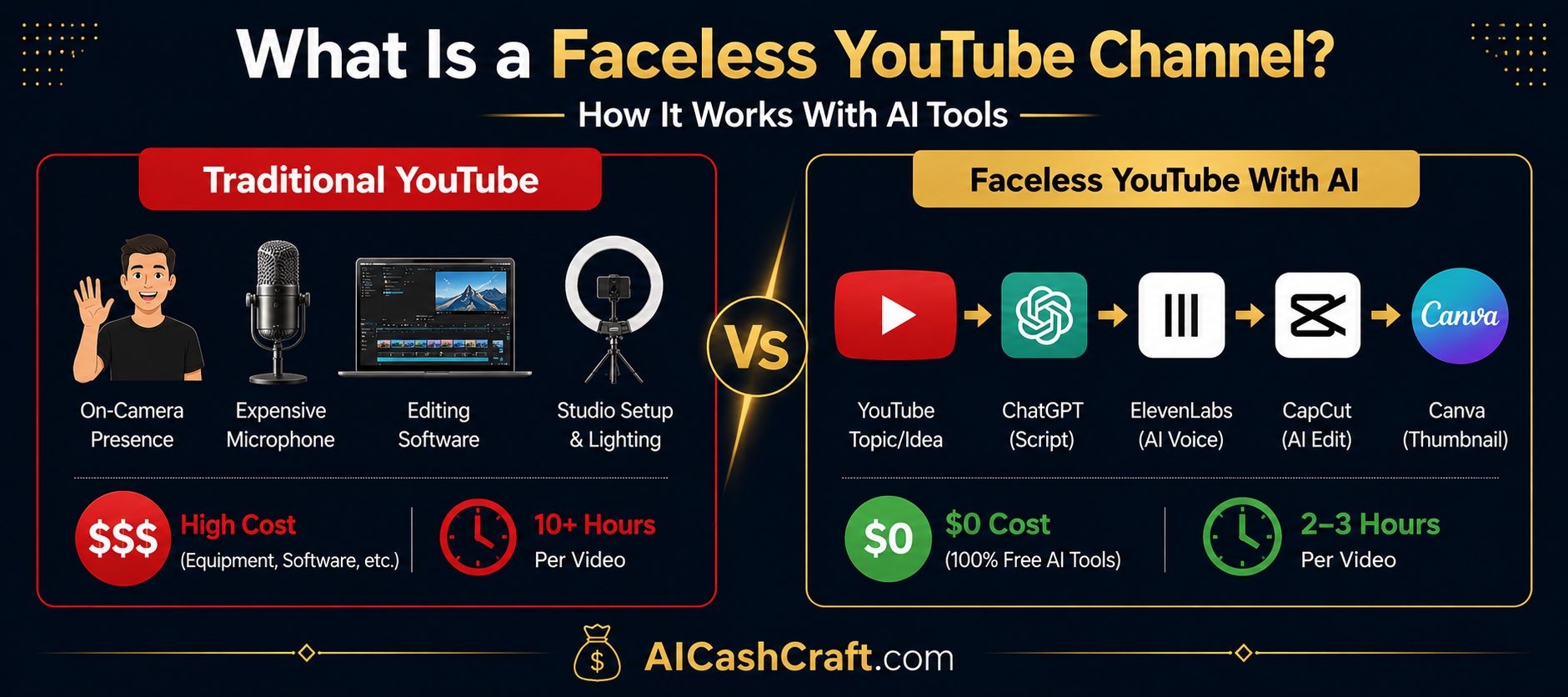
A faceless YouTube channel is a YouTube channel where the creator never appears on camera. Instead of talking directly to the camera, faceless channels use screen recordings, stock footage, animations, slideshows, or AI-generated visuals — combined with a voiceover — to deliver content.
Before AI tools, creating a faceless channel required: a professional microphone, video editing software, stock footage subscriptions, and hours of manual editing per video. AI tools can simplify many of those requirements with faster, cheaper, and often free alternatives.
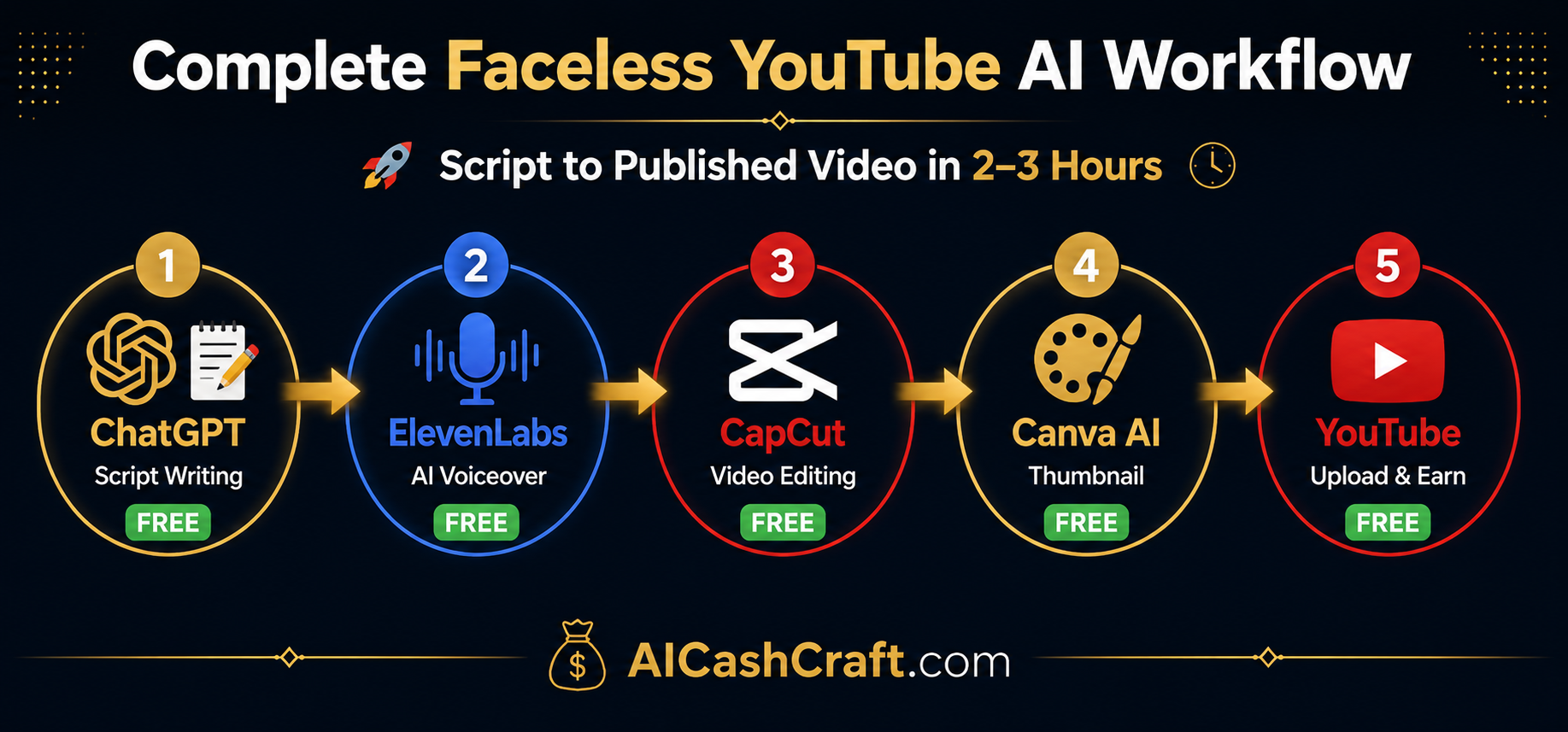
- ChatGPT writes complete scripts in minutes — replacing hours of research and writing
- ElevenLabs generates studio-quality AI voiceover — replacing a $200 microphone setup
- CapCut automatically edits stock footage and adds captions — replacing complex editing software
- Canva AI designs professional thumbnails — replacing graphic design skills
⚠️ Honest timeline: A faceless YouTube channel may take several months of consistent publishing before AdSense monetization (1,000 subscribers + 4,000 watch hours). This is the longest passive income setup time — and once monetized, older videos can continue getting views and potential ad revenue over time. Front-load the effort; the content can keep working for you.
🎯
Before starting: Use our free
AI Income Calculator to estimate realistic YouTube earnings based on your planned publishing schedule. Then use our free
ChatGPT Prompt Generator to get expert video script prompts for your first videos.
📋 Step-by-Step Guide to Starting Your Faceless YouTube Channel

Your niche determines everything — your audience, your competition level, your monetization options, and how long you can sustain consistent content creation. Choosing the wrong niche is the most common reason faceless YouTube channels struggle.
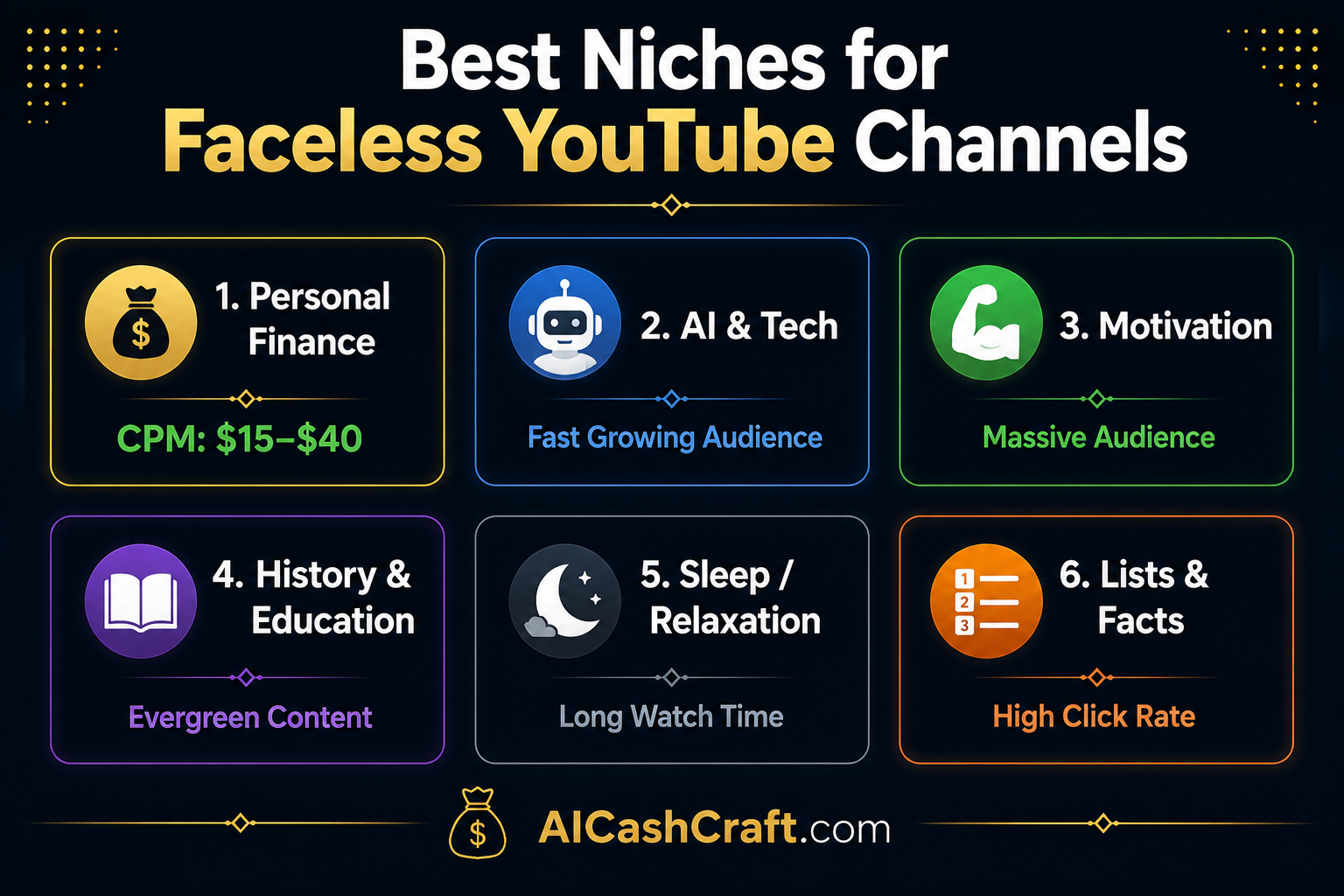
The best niches for faceless AI YouTube channels are:
💰
Personal Finance
Potentially high CPM. Evergreen content. Large audience. Easy to script with ChatGPT.
🤖
AI Tools & Tech
Fast-growing audience. Easy screen recording content. You already know this topic!
💪
Motivation & Self-Help
Huge audience. No expertise needed. AI writes inspiring scripts easily.
📚
History & Education
Evergreen content. Facts-based = easier to script. Loyal audience.
😴
Sleep & Relaxation
Very long watch time. Simple to produce. Ambient visuals + AI audio.
🔢
Lists & Countdowns
Easy format. High click-through rate. Fast to produce with AI tools.
1Use ChatGPT to test your niche — Ask: “Generate 50 video ideas for a faceless YouTube channel about [your niche]”. If you can easily come up with 50 ideas, the niche is viable.
2Check competition — Search your niche on YouTube. Channels with active views and consistent uploads are useful competition signals — big enough to prove demand, but not impossible to study.
3Choose ONE niche — Do not try to cover multiple topics. YouTube rewards niche-specific channels with stronger audience retention and faster subscriber growth.
ChatGPT ✓ Free
YouTube Search ✓ Free
A great script is the foundation of a great video. ChatGPT can write complete, engaging, well-structured video scripts in minutes — saving you hours of research and writing per video. The key is giving ChatGPT a detailed, specific prompt that includes your target audience, video length, and desired format.
1Use our free Prompt Generator — Use our free ChatGPT Prompt Generator to get expert YouTube script prompts for any niche. It eliminates the guesswork completely.
2Aim for 500–1,500 words per script — This produces a 5–12 minute video. Many educational YouTube videos perform well between 8–15 minutes when the content keeps viewers engaged.
3Structure every script the same way — Hook (first 30 seconds) → Problem/topic introduction → Main content (3–7 sections) → Summary → Call to action (subscribe + comment). Consistent structure builds audience habit.
4Always edit the script before using it — Add your own examples, adjust the tone, and make sure it sounds natural when read aloud. AI gives you a strong draft — your editing makes it great.
5Batch write scripts weekly — Write 5–7 scripts in one sitting per week. This “batch and bank” approach means you always have content ready to produce, even during your busiest weeks.
ChatGPT ✓ Free
ChatGPT Prompt Generator ✓ Free
ElevenLabs is the most realistic AI voice generator available — and its free plan is genuinely useful for beginners. The process is simple: paste your script, choose a voice from 120+ options, click Generate, and download the MP3 file. The entire process takes less than 5 minutes per video.
Why ElevenLabs stands out: Modern AI voices can sound surprisingly natural to many viewers. This is critical for keeping viewers engaged and maintaining high watch time — which can support watch time, ranking potential, and monetization later.
1Sign up for ElevenLabs free — Go to elevenlabs.io. Create a free account. The free plan includes 10,000 characters per month — enough for 2–4 full videos.
2Choose the right voice — Test several voices with a short paragraph before committing. Choose one consistent voice for your entire channel to build brand recognition with your audience.
3Paste script and generate — Copy your edited ChatGPT script → Paste into ElevenLabs text box → Click Generate → Download MP3. That is the entire process.
4Upgrade when ready — The Starter plan ($5/month) gives 30,000 characters — enough for 8–10 full videos per month. Upgrade once your channel starts earning to justify the cost.
ElevenLabs ✓ Free (10K chars/mo)
ElevenLabs Starter $5/mo
See more AI audio tools: Best AI Productivity Tools for Beginners →
🎯 Ready to Find Your Perfect AI Tools?
Take our free AI Tool Finder Quiz — 5 questions, 60 seconds, and you get a personalized tool recommendation for your specific YouTube channel goal.
Find My AI Tools →
Calculate YouTube Income →
🚀 Free AI Creator Tips
Learn AI Tools & YouTube Ideas Step by Step
Join the AICashCraft newsletter for beginner-friendly AI guides, free tools, YouTube ideas, prompts, and practical online income strategies.
No spam. Unsubscribe anytime.
CapCut is one of the most useful free video editors for faceless YouTube beginners. It handles everything a faceless channel needs — stock footage, automatic captions, background music, transitions, and AI-powered enhancements — without requiring any prior video editing experience.
1Download CapCut — Available free on Windows, Mac, iOS, and Android. Create a free account and open a new project.
2Import your ElevenLabs voiceover — Drag the MP3 file into your CapCut timeline. This becomes the audio backbone of your entire video.
3Add stock footage from CapCut’s library — CapCut has a built-in stock footage library with thousands of free clips. Search for footage related to your video topic and drag clips into the timeline above your audio.
4Enable AI Auto Captions — Click “Captions” → “Auto Captions” → Select language → Generate. CapCut automatically creates styled subtitles synchronized with your voiceover. This feature can help make videos easier to follow and may support watch time.
5Add background music — Use CapCut’s free music library. Choose instrumental, ambient music — nothing with lyrics. Set the volume to 10–15% so it complements the voiceover without competing with it.
6Export at 1080p — Click Export → Select 1080p resolution → Export. CapCut can export videos for free on desktop, depending on current app settings and features.
CapCut ✓ 100% Free
Built-in Stock Library ✓ Free
AI Auto Captions ✓ Free
See all AI video tools: Best AI Video Tools for Beginners →
Your thumbnail is one of the biggest factors that influences whether someone clicks your video or scrolls past it. A strong thumbnail can improve click-through rate, which may lead to more views, more watch time, and stronger growth over time. Canva AI makes creating professional thumbnails fast and free.
1Use YouTube thumbnail template in Canva — Search “YouTube thumbnail” in Canva. Choose a template that matches your niche style. All templates are fully editable and free.
2Use large, bold text — Thumbnails are seen at small sizes in search results. Use 3–5 words maximum in large, bold, high-contrast text. The text should intrigue or create curiosity.
3Use bright colors on dark backgrounds — Gold, orange, and red on dark navy or black backgrounds often stand out well in YouTube’s interface.
4Create a consistent thumbnail style — Same fonts, same color scheme, same layout style for every video. Viewers recognize your thumbnails immediately, which increases returning viewers and channel loyalty.
Canva AI ✓ Free
250,000+ Templates ✓ Free
See AI design tools: Best AI Image Tools for Beginners →
Publishing your video correctly is as important as creating it well. YouTube SEO determines how many people discover your video through search — and ChatGPT can write every element of your YouTube SEO in under 5 minutes.
1Write SEO title with ChatGPT — Ask ChatGPT: “Write 10 YouTube video titles for a video about [topic] targeting beginners. Include numbers and power words. Keep each under 60 characters.” Choose the most compelling option.
2Write description with ChatGPT — First 2–3 sentences should contain your main keyword. Include timestamps, links to related videos, and a subscribe call to action. Descriptions help YouTube understand your video topic.
3Add relevant tags — Use ChatGPT to generate 15–20 relevant tags for your video topic. Include your main keyword, related keywords, and niche-specific terms.
4Upload your Canva thumbnail — Never use the auto-generated YouTube thumbnail. A strong custom Canva thumbnail usually gives you a better chance of attracting clicks than a random auto-generated frame.
5Publish consistently — 3 videos per week — Consistency is one of the most important parts of this guide. Regular publishing helps YouTube understand your channel and gives you more data to improve over time.
ChatGPT ✓ Free
YouTube Studio ✓ Free
Blog Title Generator ✓ Free
💰 How to Monetize Your Faceless YouTube Channel
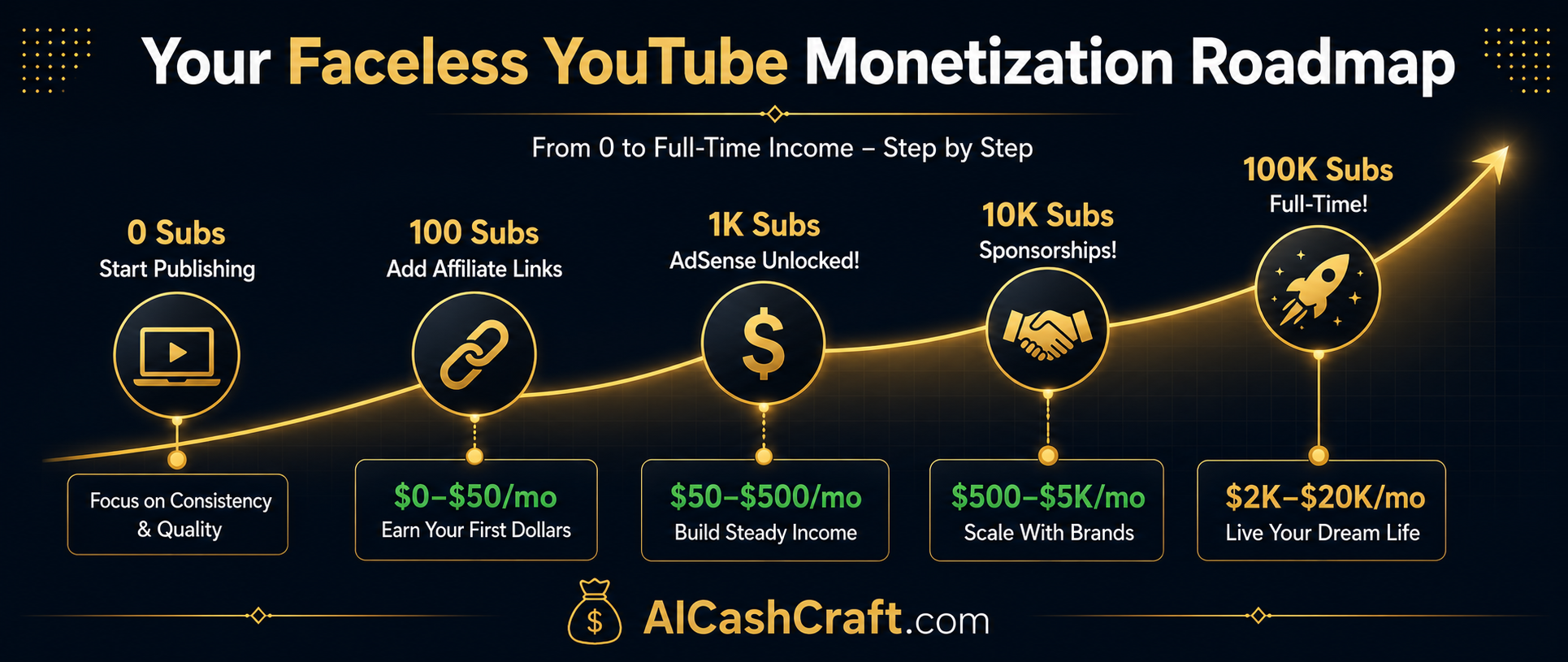
YouTube offers multiple monetization options — and strong channels often combine several income sources over time. Here is the complete monetization roadmap:
Stage 1
0–100
$0/month
Focus: Publishing consistently 3x/week
Stage 2
100–1K
$0–$50/mo
Add: Affiliate links in descriptions
Stage 3
1K–10K
$50–$500/mo
Unlocked: AdSense monetization
Stage 4
10K–100K
$500–$5K/mo
Add: Sponsorships + digital products
Multiple Income Streams From One Channel
- YouTube AdSense — Potential ad revenue from video views (requires 1,000 subs + 4,000 watch hours)
- Affiliate marketing — Add affiliate links in video descriptions from day one. Earn possible commissions when viewers buy through your links
- Sponsored content — Some brands may pay for sponsored videos once your channel has a relevant audience
- Digital products — Sell your own ChatGPT prompt packs, Canva templates, or eBooks to your audience
- Channel memberships — Offer exclusive content to paying subscribers (unlocked at 500 subscribers)
💡
Start affiliate marketing from video 1: Add affiliate links to AI tools you mention in your videos. If your channel is about AI tools, you can start adding helpful affiliate links to tools like Canva, Grammarly, Jasper AI, and other tools from your early videos — long before AdSense is available. Explore our
AI Side Hustles guide for more monetization strategies.
⚠️ Common Mistakes That Kill Faceless YouTube Channels
❌ Inconsistent publishing — Missing even one week resets your momentum significantly. YouTube’s algorithm deprioritizes channels that go quiet. Plan 3 videos per week minimum and batch-create to stay ahead of schedule.
❌ Bad niche selection — “General knowledge” or “interesting facts” channels are too broad to rank for anything. Pick a specific niche with a defined audience and stick with it for at least 50 videos before evaluating.
❌ Ignoring thumbnails — Many beginners spend all their time on video quality and use auto-generated thumbnails. Your thumbnail is the first thing viewers see. A bad thumbnail means people never watch your great video.
❌ Publishing raw AI scripts without editing — AI scripts sound great until they are recorded — then they sometimes sound robotic or unnatural. Always read your script aloud before generating the voiceover. Edit anything that sounds awkward.
❌ Quitting before 50 videos — Most faceless channels see very little growth in the first 20–30 videos. Growth can improve after publishing more videos because YouTube gets more signals about your channel topic. Commit to 50 videos before evaluating success.
💡 Pro Tips for Faster Faceless YouTube Growth
Batch produce your videos — script 5 videos on Monday, record voiceovers Tuesday, edit Wednesday and Thursday, schedule Friday. This workflow means your channel never misses a publishing day even during busy weeks.
Use our free
ChatGPT Prompt Generator to get expert YouTube script prompts — structured for strong hooks, clear storytelling, and high viewer retention throughout the video.
Add your channel link to all your other content — blog posts, Etsy listings, and Pinterest pins. Cross-promotion from other platforms gives your channel an early subscriber boost outside of YouTube search.
Study your analytics after every 10 videos — which videos got the most views, highest watch time, and best click-through rate. Double down on those video formats and topics. Data removes guesswork from your content strategy.
Start affiliate marketing from video 1 — recommend AI tools relevant to your niche in every video description. This can create monetization potential before AdSense is available. See our
Best AI Tools for Making Money guide →
🎯 Final Thoughts — Start Your First Video This Week
Starting a faceless YouTube channel with AI is one of the best beginner-friendly long-term content opportunities. The setup cost is zero, the tools are free, and your income potential can grow over time as your channel, content library, and audience grow.
The action plan is simple:
- Today — Choose your niche and set up your YouTube channel (free, 30 minutes)
- This week — Write 3 scripts with ChatGPT, generate voiceovers with ElevenLabs
- This weekend — Edit all 3 videos in CapCut, design thumbnails in Canva AI
- Next week — Publish video 1. Keep publishing 3x per week consistently
- Month 3–6 — Apply for AdSense. Start building long-term online income potential daily
Explore all the AI tools you need in our Best AI Tools for Beginners guide. See all passive income methods in our AI Side Hustles guide. And use our free AI Side Hustle Generator to confirm this is the right income method for your specific situation.
📚 Related Guides You Will Love
❓ Frequently Asked Questions — Faceless YouTube Channel With AI
Can I really start a YouTube channel without showing my face?
Absolutely — many successful YouTube channels never show the creator’s face. Finance channels, motivation channels, history channels, educational channels, and many more use stock footage, screen recordings, and AI voiceover instead. YouTube does not require creators to appear on camera in any way.
How much can I earn from a faceless YouTube channel?
Earnings depend on your niche, view count, and monetization methods. With AdSense alone, channels may earn different rates per 1,000 views depending on niche, audience, and ad demand (CPM varies by niche). A channel with consistent monthly views can earn from ads, while affiliate marketing and sponsored content may add extra income over time. Use our free AI Income Calculator for specific estimates based on your planned publishing schedule.
How long does it take to monetize a faceless YouTube channel?
YouTube requires 1,000 subscribers and 4,000 watch hours to join the YouTube Partner Program and unlock AdSense. Publishing 3 videos per week in a focused niche, some beginner channels may take several months or longer to reach this threshold. The timeline depends heavily on niche selection, video quality, thumbnail click-through rate, and publishing consistency.
What is the best niche for a faceless YouTube channel?
Personal finance can be a high-value niche because advertisers often pay more for finance-related audiences. AI tools and technology is a fast-growing niche. Motivation and self-help can also attract a large audience. The best niche for you is one you can consistently generate content ideas for — which you can test by asking ChatGPT to generate 50 video ideas for your chosen niche before committing.
Is ElevenLabs AI voice good enough for YouTube?
Yes — ElevenLabs produces some of the most realistic AI voices available, and many faceless YouTube creators use it in their workflow. The free plan (10,000 characters/month) is enough for 2–4 videos. A natural-sounding AI voice can help keep the video easier to listen to and may support retention.
How many videos do I need to publish before seeing growth?
Many faceless YouTube channels need a content library before growth becomes easier to evaluate. This is when YouTube’s algorithm starts understanding your channel’s topic and recommending your videos to relevant audiences. Commit to publishing at least 50 videos before evaluating whether your channel is growing. Consistent publishing for several months is usually more useful than sporadic posting.
Do I need to buy any tools to start a faceless YouTube channel?
No — ChatGPT (free), ElevenLabs (free), CapCut (free), and Canva AI (free) cover every step of the faceless YouTube production workflow. The only costs are optional upgrades when your channel starts earning: ElevenLabs Starter ($5/month for more characters) and Canva Pro ($15/month for brand kit and more assets). Start free and upgrade when income justifies it.