How to Use ChatGPT to Write Blog Posts — 7 Easy Steps for Beginners
How to use ChatGPT to write blog posts — this complete step-by-step guide shows you exactly how to go from blank page to published blog post using AI. Learn the exact prompts, workflow, and SEO tips that help beginners write faster, better blog content using ChatGPT completely free.
If you want to know how to use ChatGPT to write blog posts, you are in the right place. Writing blog posts manually takes hours — researching topics, creating outlines, drafting sections, editing, and optimizing for SEO. ChatGPT can compress this entire process into minutes. With the right prompts and workflow, even complete beginners can produce professional, SEO-optimized blog posts consistently using ChatGPT for free.
This guide covers the complete ChatGPT blog writing process from choosing a topic to publishing — including the exact prompts to use at every step, how to make AI content sound human, and how to optimize every post for Google. For more AI writing tools beyond ChatGPT, see our guide on the best AI writing tools for beginners → and our complete ChatGPT for Beginners guide →
✍️ How to Use ChatGPT to Write Blog Posts — What You Need to Know First
Before diving into the step-by-step process of how to use ChatGPT to write blog posts, there are two important things every beginner should understand. First, ChatGPT is a writing assistant — not a replacement for your judgment. The best ChatGPT blog writing workflow treats AI as a first-draft generator that you then review, edit, and personalize. Second, the quality of your ChatGPT output depends almost entirely on the quality of your prompts — vague prompts produce generic content, specific prompts produce focused, useful content.
With those foundations in place, using ChatGPT to write blog posts becomes one of the most powerful productivity tools available to any content creator. Bloggers who use ChatGPT strategically report writing 3–5x more content per week than before — which directly translates to faster traffic growth and more income opportunities. See how this pairs with our How to Start an AI Affiliate Blog guide →
What You Need to Use ChatGPT for Blog Writing
- Free ChatGPT account at chat.openai.com — no credit card required
- A blog topic and target keyword — even a rough idea works
- Basic understanding of your target audience
- A WordPress blog or any publishing platform
- RankMath or Yoast SEO plugin for optimization
🚀 7 Steps — How to Use ChatGPT to Write Blog Posts
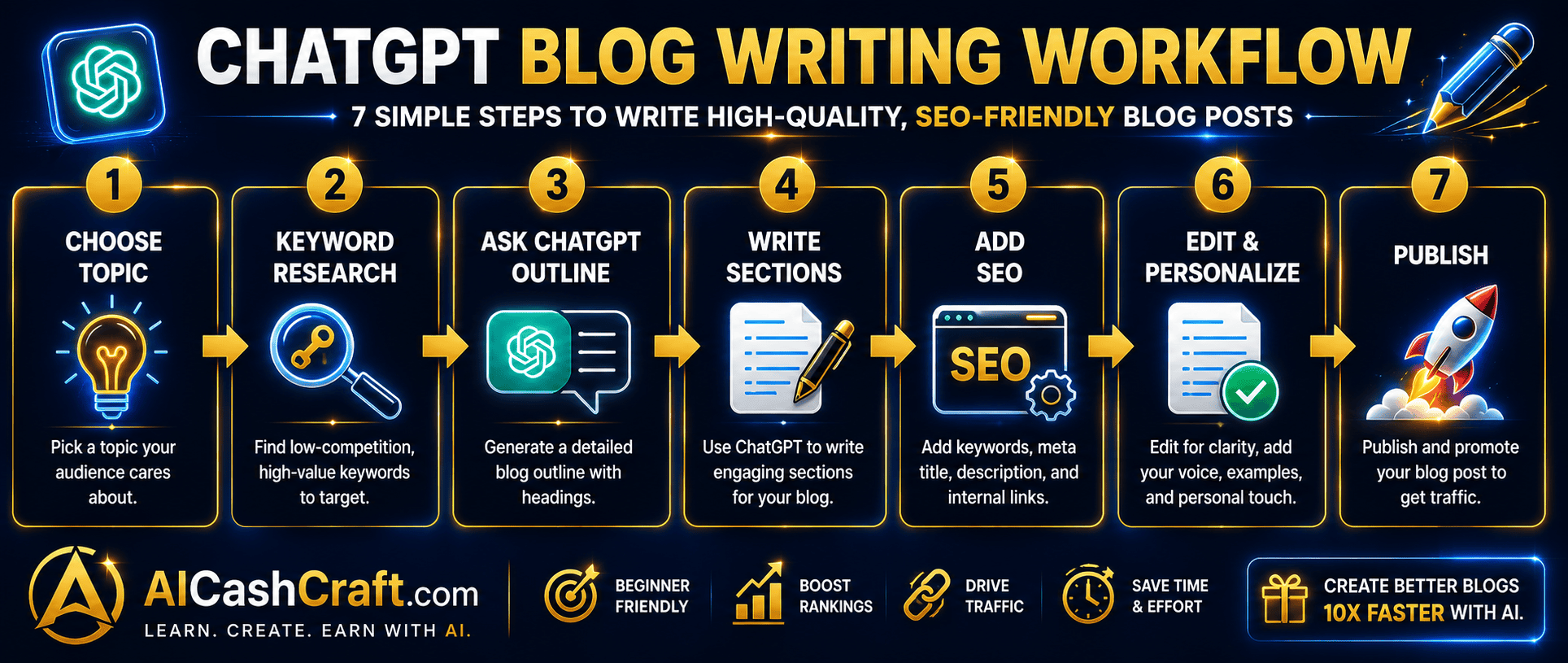
Step 1 — Choose Your Blog Topic and Target Keyword
Every great blog post starts with a clear topic and a target keyword that people actually search for. Before opening ChatGPT, decide what you want to write about and identify one main keyword to target. Use Google’s autocomplete, People Also Ask, or our free Blog Title Generator to find topics with real search demand. A clear topic before you start means better, more focused ChatGPT output throughout the entire writing process.
💡 Example: Topic = “AI writing tools”, Keyword = “best AI writing tools for beginners”. The more specific your topic, the better ChatGPT performs at every subsequent step.Step 2 — Ask ChatGPT to Research the Topic
Before writing, use ChatGPT to gather key information, statistics, and angles on your topic. This step ensures your blog post includes accurate, comprehensive information rather than surface-level content. Ask ChatGPT what beginners most need to know, what common misconceptions exist, and what questions people frequently ask about the topic.
Research Prompt to Use:
Step 3 — Generate a Complete Blog Outline
A strong outline is the foundation of a well-structured blog post. Ask ChatGPT to create a detailed outline with H2 and H3 headings, word count targets per section, and your focus keyword included naturally in the heading structure. A good outline generated here makes every subsequent writing step significantly faster and more organized.
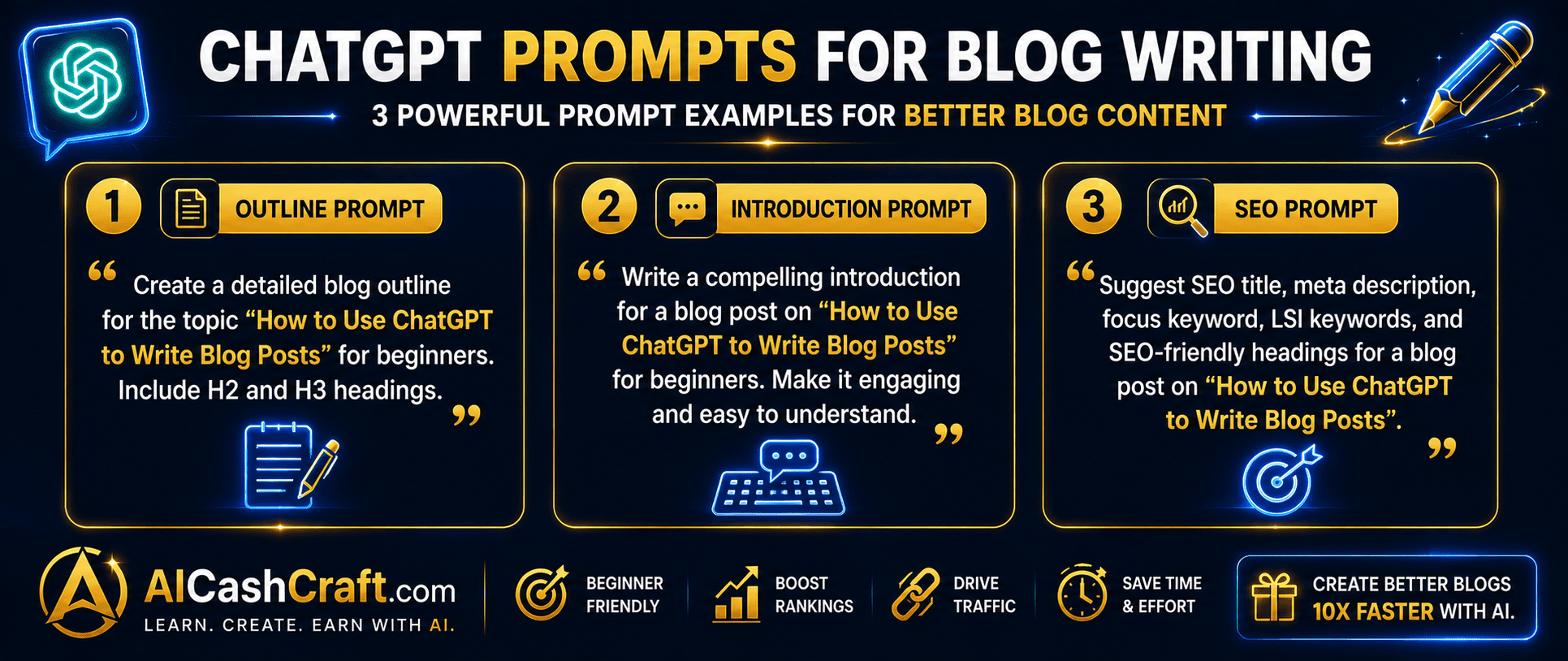
Outline Prompt to Use:
Step 4 — Write Each Section With Specific Prompts
Do not ask ChatGPT to write the entire blog post in one prompt — this produces generic, repetitive content. Instead, write each H2 section separately with a specific, detailed prompt. This approach gives you much better control over the quality, tone, and focus of each section. Reference your outline from Step 3 and work through it section by section.
Section Writing Prompt to Use:
Step 5 — Write the Introduction and Conclusion
The introduction and conclusion are the most important sections of any blog post — write them last, after the body content is complete. A strong introduction hooks the reader, includes the focus keyword in the first 100 words, and clearly states what the post covers. The conclusion summarizes key takeaways and includes a clear call to action. Ask ChatGPT for both after all body sections are written.
Introduction Prompt to Use:
Conclusion Prompt to Use:
Step 6 — Optimize for SEO With ChatGPT
Once your blog post draft is complete, use ChatGPT to help with SEO optimization — meta description, SEO title, image alt text suggestions, and internal linking ideas. This step takes 5 minutes and significantly improves your post’s chances of ranking on Google. Always run the final post through RankMath or Yoast to check your optimization score before publishing.
SEO Optimization Prompt to Use:
Step 7 — Edit, Personalize, and Publish
The final step in how to use ChatGPT to write blog posts is the most important — editing and personalizing the AI draft before publishing. Read through the entire post and add your personal examples, opinions, and experiences. Remove any robotic, repetitive phrases. Use Quillbot to rephrase awkward sentences and Grammarly to catch grammar errors. Your personal voice is what differentiates your blog from every other AI-assisted site — never skip this step.
💡 A good rule: spend at least 20-30 minutes editing every AI-generated post. The more you personalize it, the better it performs in both search rankings and reader engagement.💬 Best ChatGPT Prompts for Blog Writing — Ready to Use
The most important skill in how to use ChatGPT to write blog posts is knowing which prompts to use. Here are the most effective ChatGPT prompts for blog writing that beginners can copy and use immediately:
ChatGPT Prompts for Blog Post Ideas
ChatGPT Prompts for Blog Post Titles
ChatGPT Prompts for FAQ Sections
ChatGPT Prompts for Making Content Sound Human
💡 7 Tips for Better ChatGPT Blog Writing Results
Start every ChatGPT session by telling it who your readers are. Example: “You are writing for complete beginners who have no technical background and are interested in making money online with AI tools.” This context dramatically improves the relevance and tone of every response in that session — ChatGPT calibrates its vocabulary, examples, and depth to match your audience.
Write an entire blog post within a single ChatGPT conversation rather than starting a new chat for each section. ChatGPT maintains context within a conversation — it remembers the topic, keyword, audience, and outline from earlier messages. Starting a new conversation means re-establishing all that context every time, which wastes time and produces less consistent output.
If a section ChatGPT produces is too generic or does not match your expectations, do not accept it — ask for a rewrite with specific feedback. Example: “This section is too generic and does not include enough practical examples. Rewrite it with 3 specific real-world examples and a more engaging, conversational tone.” ChatGPT responds well to specific critique and produces significantly better rewrites when given clear direction.
Always read your entire ChatGPT-generated blog post before publishing — even if you are in a hurry. AI writing occasionally contains factual errors, outdated information, repetitive phrases, and awkward transitions that are obvious to a human reader but invisible to AI. Publishing unreviewed AI content reflects poorly on your blog’s credibility and can harm search rankings if Google detects thin, low-quality content.
The biggest differentiator between a forgettable AI blog post and a memorable one is personal voice. After generating your draft with ChatGPT, add 3–5 personal touches — a specific example from your own experience, your honest opinion on a tool or method, a mistake you made and what you learned. These personal elements make your content unique, build reader trust, and give Google content that no other AI-generated page can duplicate.
Internal linking is one of the most important SEO factors for blog growth — and ChatGPT can help identify linking opportunities. After completing your draft, ask: “Based on this blog post about [topic], suggest 5 related topics I should have other blog posts about, and where in this post I should naturally link to them.” This improves your site’s SEO structure and helps readers discover more of your content. See our Best AI Tools for Blogging guide →
Once you have the workflow down, batch writing becomes possible — creating outlines for 5 blog posts in one ChatGPT session, then writing them systematically across several days. Batch writing is significantly more efficient than starting from scratch each time because you maintain context, momentum, and creative flow. Many successful bloggers write 3–5 post outlines in one sitting and then execute them one per day throughout the week.
💰 How to Make Money Using ChatGPT to Write Blog Posts
Knowing how to use ChatGPT to write blog posts opens up several practical income opportunities — from monetizing your own blog to offering writing services to others:
Use ChatGPT to consistently publish 3–5 SEO-optimized blog posts per week on your own blog. This content volume accelerates organic traffic growth — the foundation for display ad revenue (Google AdSense, Mediavine), affiliate commissions, and digital product sales. Most successful AI bloggers start seeing meaningful traffic within 4–6 months of consistent publishing. See our AI Affiliate Blog guide → for the complete monetization strategy.
Use your ChatGPT blog writing skills to offer freelance content writing services. With ChatGPT handling first drafts, you can produce 3–5x more content per hour than manual writing — making freelance writing significantly more profitable. Charge $25–75 per 1,000-word blog post and use ChatGPT for research, outlines, and drafts while you focus on editing, personalizing, and delivering. See our Start Freelancing With AI guide →
Offer monthly blog content packages to small businesses — 4–8 blog posts per month for a flat retainer fee. Businesses need consistent blog content for SEO but rarely have time to write it themselves. With ChatGPT blog writing in your workflow, you can manage 5–10 monthly clients simultaneously. Price packages at $200–600 per month depending on post length and research depth. See our guide on making money with ChatGPT →
❓ Frequently Asked Questions — How to Use ChatGPT to Write Blog Posts
Yes — ChatGPT can generate a complete blog post draft including introduction, body sections, conclusion, and FAQ. The key is using specific, detailed prompts at each stage rather than asking for the entire post in one prompt. Always edit and personalize the output before publishing. The 7-step workflow in this guide produces consistently better results than asking ChatGPT to write a complete post in one go.
Yes — the free ChatGPT plan at chat.openai.com includes GPT-3.5 with unlimited usage and is fully capable of completing all 7 steps in this blog writing workflow. GPT-4o is available free with daily usage limits. ChatGPT Plus ($20/month) provides priority access to GPT-4o — worth it if you are writing 10+ blog posts per week. See our complete ChatGPT for Beginners guide →
Google’s official policy evaluates content quality, not how it was created — well-written, helpful, accurate AI-assisted content can rank just as well as manually written content. The risk comes from publishing thin, unedited, generic AI content without adding genuine value. Always edit, personalize, and fact-check ChatGPT output before publishing. High-quality AI-assisted content that serves readers well ranks effectively on Google. See our AI Tools for Content Creators guide →
Using the 7-step ChatGPT blog writing workflow, a complete 1,500-word blog post takes approximately 45–90 minutes from start to publish — including research, outline, writing, SEO optimization, editing, and formatting. Compare this to 4–6 hours for a manually written post of the same quality. As you practice the workflow, speed increases significantly — experienced users complete 1,000-word posts in under 30 minutes.
The most effective ChatGPT prompts for blog writing are specific and contextual — they include the topic, target keyword, audience, tone, and word count. Generic prompts produce generic content. The prompts in this guide cover every stage of blog writing from outline to conclusion. Use our free ChatGPT Prompt Generator → to build custom blog writing prompts automatically.
To make ChatGPT blog writing sound more human: add personal examples and opinions, vary sentence length (mix short and long sentences), remove repetitive transition phrases, use Quillbot to rephrase robotic sections, and write your introduction and conclusion yourself rather than delegating them entirely to AI. The most human-sounding AI content comes from treating ChatGPT as a co-writer rather than a ghostwriter — collaborate rather than outsource completely.
📚 Related Guides
🎯 Final Thoughts — How to Use ChatGPT to Write Blog Posts
Now you know exactly how to use ChatGPT to write blog posts — from choosing your topic and generating an outline to writing sections with targeted prompts, optimizing for SEO, and editing for human voice. The 7-step workflow in this guide works for any niche, any topic, and any experience level — and it is completely free using the ChatGPT free plan.
The most important thing is to start with your first post today and iterate from there. Your first ChatGPT-assisted blog post will not be perfect — but it will be significantly faster than writing manually. With practice, the workflow becomes second nature and you will find yourself publishing more content, growing your blog faster, and opening up real income opportunities that manual writing alone could never support.
For more AI writing guides and income strategies, explore the AICashCraft Blog. Follow our YouTube channel and Instagram for free video guides and daily AI tips.
Get the latest AI writing guides, free tools, and income strategies from AICashCraft — completely free.
Top 10 Free AI Tools for Beginners
Download our free 13-page PDF guide covering the best free AI tools with beginner tips and step-by-step advice. No sign-up needed.
⬇️ Download Free PDF Guide