5 AI Digital Products Beginners Can Create and Sell for Passive Income
Selling digital products with AI is one of the most accessible passive income streams for beginners — you create them once using free AI tools and sell them repeatedly with no inventory, no shipping, and no ongoing production cost. Prompt packs, Canva templates, planners, mini-guides, and swipe files are all products that buyers purchase regularly and AI tools help you create in hours rather than days.
The appeal of AI digital products is simple — you invest time once to create something, and then that product earns money every time someone buys it, without any additional work from you. Unlike freelancing, where each dollar requires new effort, or a service business, where income stops when you stop working, a well-created digital product generates sales while you sleep.
AI tools have dramatically reduced the time and skill required to create sellable passive income products. ChatGPT writes the content. Canva AI designs the visuals. ElevenLabs records the audio if needed. What used to take a designer or writer days now takes a prepared beginner hours — and the product quality is genuinely competitive with what professional creators charge for.
Already selling on Etsy? Our Make Money on Etsy With AI guide covers the Etsy-specific workflow in detail. New to AI income methods? Start with our complete AI Side Hustles guide first.
💡 Why AI Digital Products Are Perfect for Beginners
Not all passive income methods are equally accessible to beginners. AI digital products stand out because they require no audience to start, no upfront investment, and no technical skills beyond using ChatGPT and Canva — both of which have free plans and beginner-friendly interfaces.
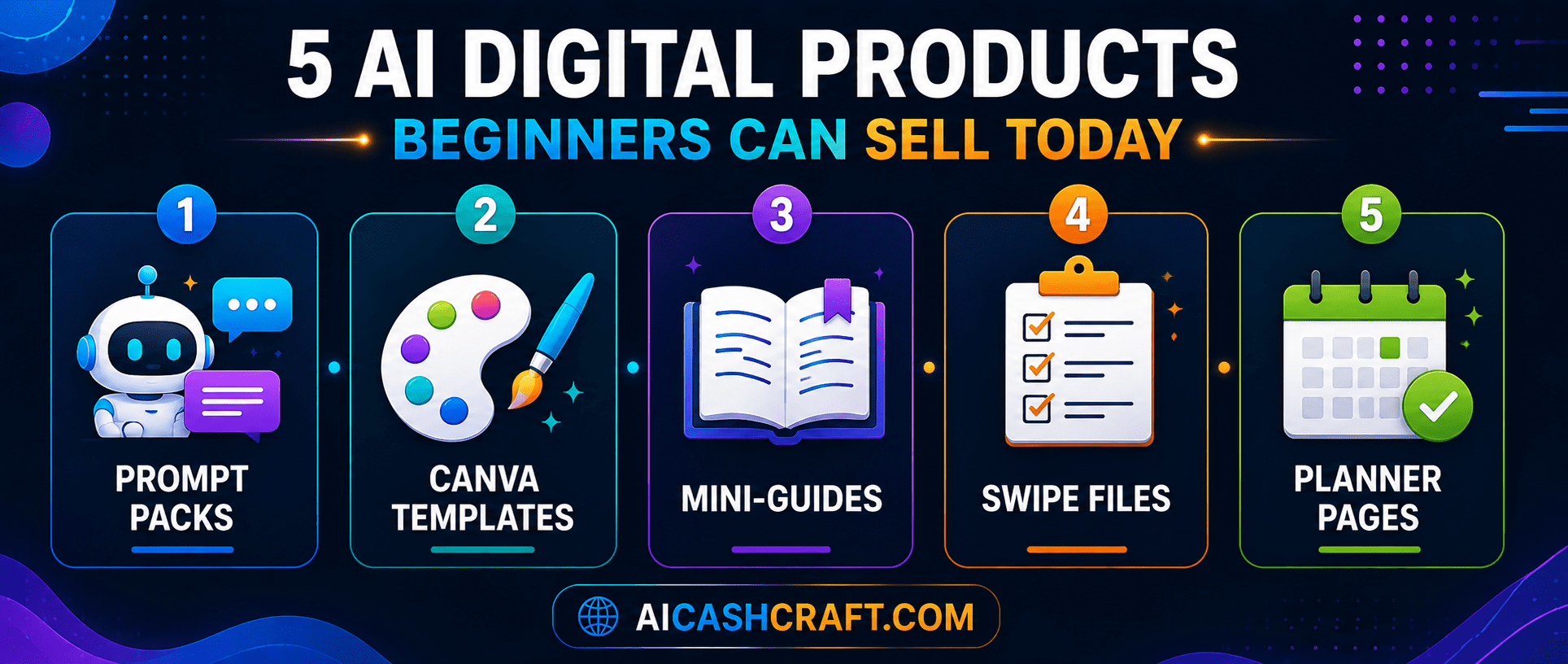
📦 5 Best AI Digital Products for Beginners to Create and Sell
A prompt pack is a collection of 20 to 50 carefully written ChatGPT prompts organized around a specific use case — “50 ChatGPT Prompts for Freelance Writers,” “30 ChatGPT Prompts for Etsy Sellers,” or “40 ChatGPT Prompts for Social Media Managers.” Buyers pay $5 to $27 for a pack because writing good prompts takes time and the prompts deliver real value when used. You write the prompts with ChatGPT’s help, format them in a PDF using Canva, and sell the file as an instant download.
💡 Use our free ChatGPT Prompt Generator as a starting point — then expand and specialize the prompts for a specific audience. Your prompt pack competes on niche specificity, not generic ChatGPT basics.Canva templates — Instagram post sets, Pinterest pin templates, presentation slides, resume layouts, media kits, lead magnets — are among the highest-demand digital products on Etsy and Gumroad. Use Canva AI to design a cohesive set of 10 to 20 templates in a consistent style, then share the Canva template link (editable by the buyer) as your product file. Niche template sets for specific industries (real estate agents, coaches, food bloggers) consistently outsell generic designs.
💡 Create template sets in batches — one color palette + font combination produces a full set of matching Instagram, Pinterest, and story templates in 2 to 3 hours. Bundle related templates together for higher perceived value and higher prices ($15 to $47).Short, practical guides of 5,000 to 15,000 words that teach beginners how to do something specific using AI tools. Examples: “How to Start Freelancing With ChatGPT — A Beginner Step-by-Step Guide,” “The Complete AI Tools Starter Kit for Small Business Owners,” or “How to Make Money Selling Prompt Packs.” Use ChatGPT to draft each chapter, Canva to design a professional cover and PDF layout, and your own knowledge and editing to make it genuinely useful. Price at $7 to $37 depending on length and depth.
💡 Mini-guides that tie directly to your existing blog content have the highest conversion — readers who find your blog post about a topic become buyers of the deeper guide. Use internal links from your blog posts to your product listings.A swipe file is a collection of tested, ready-to-use copy, captions, subject lines, or hooks that buyers can adapt to their own brand. Examples: “90 Social Media Caption Templates for Coaches,” “52 Email Subject Lines That Get Opened,” “30 YouTube Hook Scripts for AI Content Creators.” Use ChatGPT to generate the raw content, refine it into a polished spreadsheet or PDF, and sell it as an instant download. Buyers treat these as time-saving tools rather than content — which justifies higher prices ($9 to $37).
Daily planners, content calendars, habit trackers, goal-setting worksheets, and budget templates are consistently among Etsy’s best-selling digital downloads. Use Canva’s free templates as a foundation, customize with AI-generated text content, and export as print-ready PDFs. Niche planners for specific audiences (“AI side hustle planner,” “freelancer weekly schedule,” “content creator monthly tracker”) sell better than generic ones and face significantly less competition.
💡 Bundle planner pages into themed sets — a “90-Day Goal Planner Bundle” with a goal-setting worksheet, weekly planner, daily tracker, and reflection template sells at $15 to $27 and feels substantially more valuable than individual pages at $3 to $5 each.🚀 How to Create and Sell AI Digital Products — Step by Step
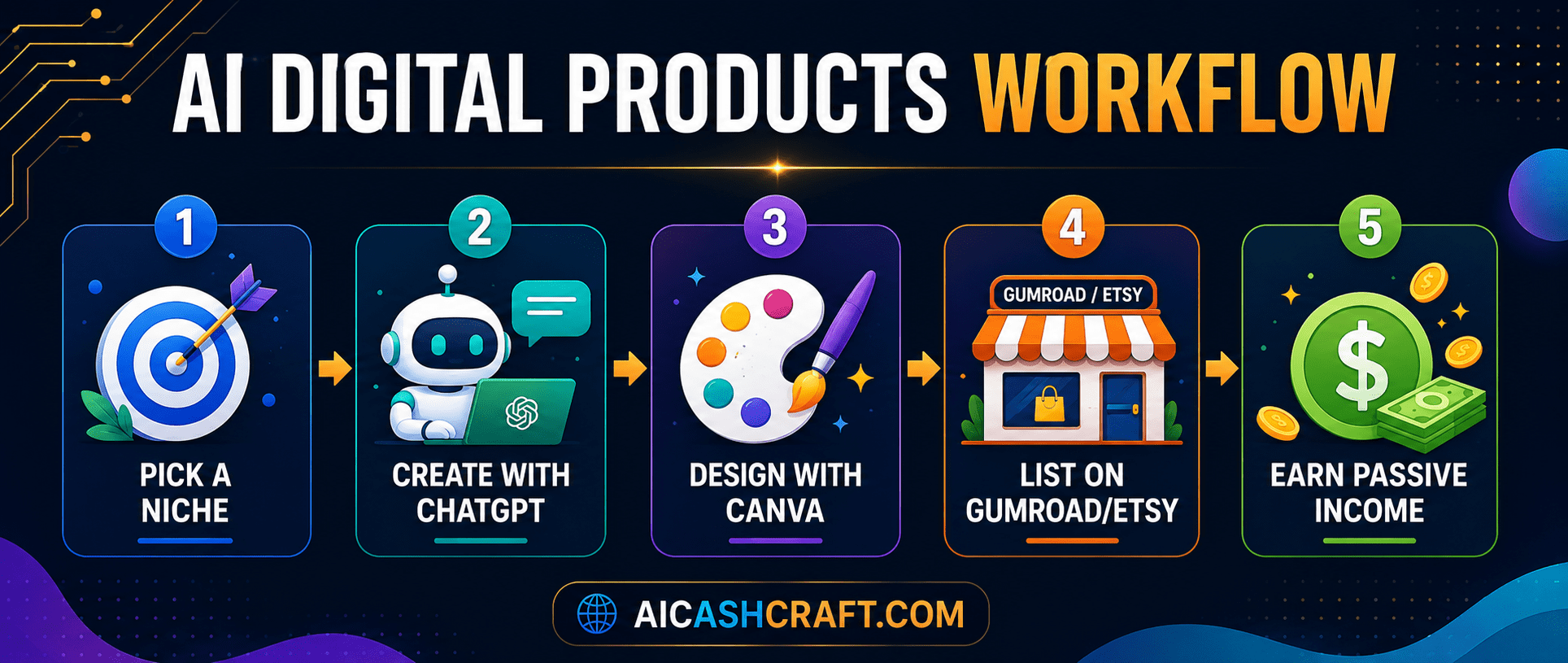
The most common mistake with AI digital products is making something too general. “ChatGPT prompts” is too broad. “ChatGPT prompts for freelance copywriters” is specific enough to find and convert a defined buyer. Before creating anything, identify your audience (who specifically will buy this) and the problem it solves (what time does it save, what result does it help them achieve). Specific products convert better, face less competition, and attract the right buyers who leave positive reviews.
Give ChatGPT a detailed prompt that specifies your product type, target audience, and what each item in the product should accomplish. For a prompt pack: “Write 30 detailed ChatGPT prompts for freelance copywriters — covering client proposals, email sequences, social media copy, and blog post outlines. Each prompt should include the goal, context, and output format.” Review, refine, and add your own expertise and examples. The AI handles the first draft; your judgment and editing make it worth buying.
💡 Always test the prompts or content yourself before packaging — you want to be confident the product actually works before selling it, and the testing process often reveals improvements that significantly increase the product’s value.Open Canva and create a professional product file — a PDF for guides and prompt packs, a Canva template link for template products, or a formatted spreadsheet for swipe files. Your product’s visual presentation directly affects perceived value and price. A well-designed PDF formatted in your brand colors at $17 feels substantially more valuable than the same content in a plain Google Doc at $5. Canva’s free templates and AI design suggestions make professional formatting achievable for beginners.
💡 Create a product cover image — a simple Canva-designed mockup showing your PDF or template on a device screen — to use as your product listing image. Products with professional mockup images consistently convert better than plain file screenshots.Upload your product file and write a compelling listing — a clear title (include the problem it solves and who it is for), a benefit-focused description (what the buyer gets and what it helps them accomplish), and relevant tags or categories. Gumroad is the fastest to set up with no monthly fee. Etsy gives you access to an existing marketplace audience. Payhip offers a free plan with slightly different features. Most successful sellers list on at least two platforms to maximize reach.
Share each new product in your existing content channels — your newsletter, social media posts, blog articles, and Quora answers. Every piece of content you create is an opportunity to mention a relevant product. Then create your next product. The income from your digital product catalog compounds as your catalog grows and as reviews accumulate on existing products. A catalog of 15 to 25 focused products generates meaningfully more income than a single product regardless of how good it is.
💡 Cross-promote related products — add a “you might also like” note inside each product pointing to your other listings. Buyers who purchase one product from you are the most likely to purchase a second, especially if it complements what they already bought.🛒 Best Platforms to Sell AI Digital Products
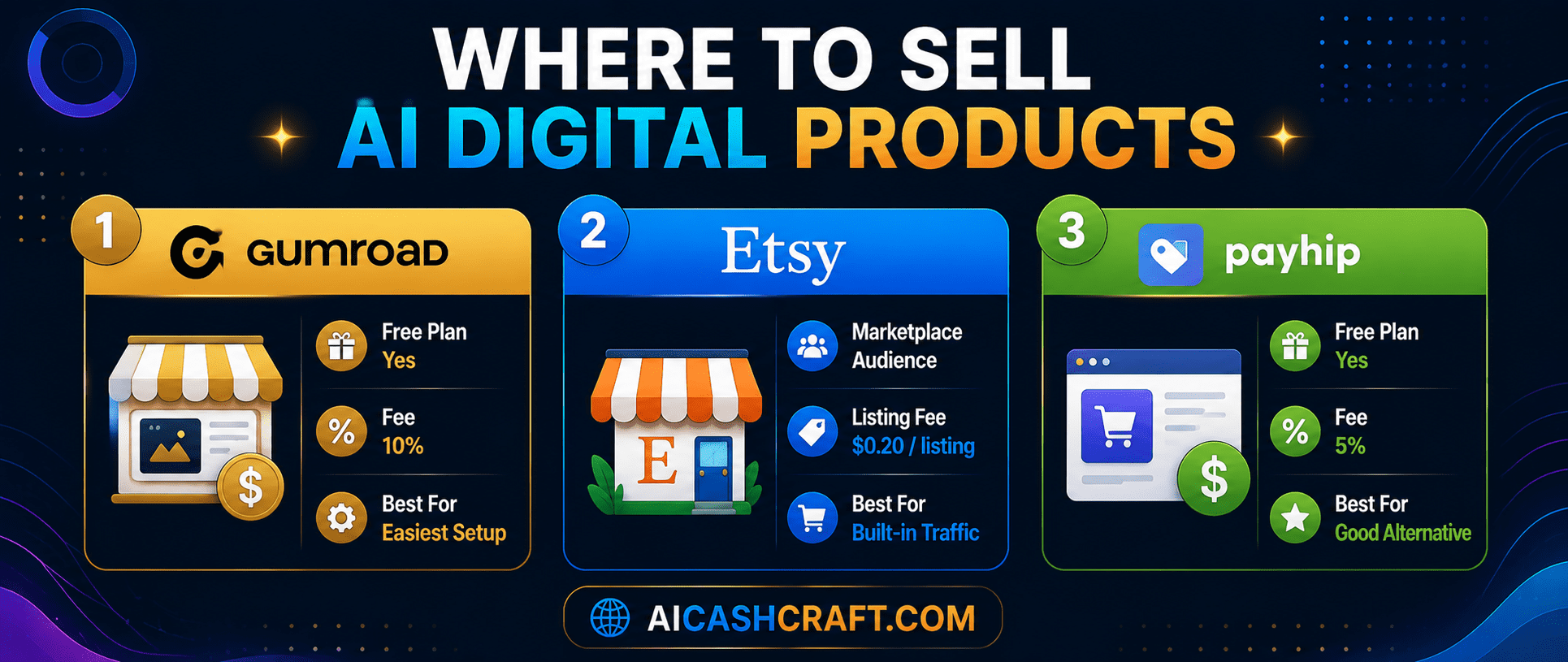
| Platform | Monthly Fee | Transaction Fee | Best For |
|---|---|---|---|
| Gumroad | Free | 10% per sale | Simplest setup, direct to audience |
| Etsy | Free (+ $0.20/listing) | 6.5% transaction fee | Built-in marketplace, discovery |
| Payhip | Free | 5% per sale | Lower fees, good alternative |
| Own website | Hosting cost | Minimal (Stripe/PayPal) | Best margins, needs own traffic |
❓ Frequently Asked Questions — AI Digital Products
ChatGPT prompt packs are the easiest starting point — they require only a text editor and ChatGPT’s free plan to create, take 2 to 3 hours per pack, and have consistent buyer demand on Gumroad and Etsy. Canva templates are a close second — Canva’s free templates make professional-quality starting points that beginners can customize within an afternoon. Both product types can be listed and selling on the same day they are created — making them the ideal starting point.
Pricing for common AI digital products: prompt packs ($5 to $27), Canva template sets ($9 to $47), mini-guides and ebooks ($7 to $37), swipe files ($9 to $37), planner bundles ($7 to $27). Price based on the value delivered and perceived effort required by the buyer — a comprehensive, well-designed product at a slightly higher price often converts better than a cheap, basic product because buyers associate price with quality.
No — platforms like Etsy have built-in search traffic, and Gumroad products can be discovered through blog content and social media even with a small following. Starting without an audience is normal. Traffic and sales build gradually as your catalog grows, reviews accumulate, and your content (blog posts, newsletter, social media) creates organic pathways to your products. You do not need 10,000 followers to make your first sale.
Yes — both platforms allow AI-assisted digital products with appropriate disclosure. Etsy requires sellers to disclose when AI tools are used in the creation process — there is a specific field for this during listing. Gumroad has no such restriction but honest disclosure is good practice. Always check the current platform policies at the time of listing, as marketplace rules evolve. Being transparent about AI use rarely hurts sales and often builds trust with buyers who appreciate the honesty.
Most beginners find that meaningful passive income from your product catalog starts around 10 to 15 products with some reviews and established search rankings — typically 2 to 4 months after consistent publishing. A catalog of 20 to 30 focused, well-reviewed products in a related niche is where most creators report genuinely significant passive income. The early months are about building the catalog; the compounding income comes later as reviews and organic discovery accumulate.
The core free stack for AI digital products is: ChatGPT free plan (content creation), Canva free plan (design and PDF formatting), and Gumroad free plan (selling and delivery). This combination covers every product type in this guide at zero cost. For image generation inside products, Adobe Firefly (25 free credits/month) and Leonardo AI (daily free credits) add visual variety. See our Top AI Tools for Beginners guide for full reviews of each free tool.
📚 Related Guides on AI Digital Products and Income
🎯 Final Thoughts — AI Digital Products Start With One Product Today
The most important thing about AI digital products is starting. Pick one product type from this guide — a prompt pack or a Canva template set are the fastest — choose a specific niche audience, and create your first product today. List it on Gumroad. Then create the next one.
The compounding nature of a digital product catalog means that the effort you put in now continues paying returns indefinitely. A prompt pack you create today could still be generating sales a year from now with no additional work. That is the core value of selling digital downloads with AI as a passive income strategy — and AI tools make building that catalog faster and more accessible than ever before for beginners.
For more practical AI income guides, explore the AICashCraft Blog. Follow our AICashCraft YouTube channel and Instagram for daily AI tips and income strategies.
Get beginner-friendly AI digital product guides, free tools, and passive income strategies from AICashCraft — completely free.
Top 10 Free AI Tools for Beginners
Download our free 13-page PDF guide covering the best free AI tools with beginner tips and step-by-step advice. No sign-up needed.
⬇️ Download Free PDF Guide